

Zabbix is a powerful open-source monitoring platform capable of tracking metrics across servers, networks, and applications. By integrating Artificial Intelligence (AI), you can extend Zabbix’s functionality to build an intelligent personal assistant — one that provides insights, summarises alerts, and even recommends corrective actions based on historical data.
This article explains how to create an AI-driven assistant that interacts with Zabbix data and provides real-time analysis and automation.
Prerequisites
- A working Zabbix Server.
- An API key of any AI API.
- Basic understanding of shell scripting.
In this post, we’ll be using the Gemini API key to enable AI integration. To get started
using your Google account. Once logged in, navigate to the Get API Key section under your project settings, create a new key, and copy it securely. This key will allow your Zabbix assistant to communicate with the Gemini model for generating insights and recommendations based on your monitoring data.
Step 1:
- Login to your Zabbix server navigate to /usr/lib/zabbix/alertscripts/
cd /usr/lib/zabbix/alertscripts/2. Create the file zabbix_gemini.sh and open it in an editor
vim /usr/lib/zabbix/alertscripts/zabbix_gemini.sh3. Paste your code content into the file.
#!/bin/bash

# Replace with your Gemini API key
API_KEY="Paste your API Key here"
ENDPOINT="https://generativelanguage.googleapis.com/v1beta/models/gemini-2.0-flash:generateContent?key=${API_KEY}"

# Read Zabbix alert message from argument or stdin
if [ -n "$1" ]; then
  ALERT_MSG="$1"
else
  read -r ALERT_MSG
fi

# Prepare the JSON payload
JSON_PAYLOAD=$(jq -n \
  --arg msg "Analyze this Zabbix alert and provide a summary, cause, and recommendations: $ALERT_MSG" \
  '{contents: [{parts: [{text: $msg}]}]}')

# Make the API request
RESPONSE=$(curl -s -X POST "$ENDPOINT" \
  -H "Content-Type: application/json" \
  -d "$JSON_PAYLOAD")

# Extract and print the Gemini response
SUMMARY=$(echo "$RESPONSE" | jq -r '.candidates[0].content.parts[0].text')

# Output for Zabbix or logs
echo "$SUMMARY"
4. Make the script executable:
chmod +x zabbix_gemini.shStep 2:
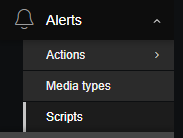
- Access your zabbix UI and navigate to Alerts >> Scripts >> Create Script.
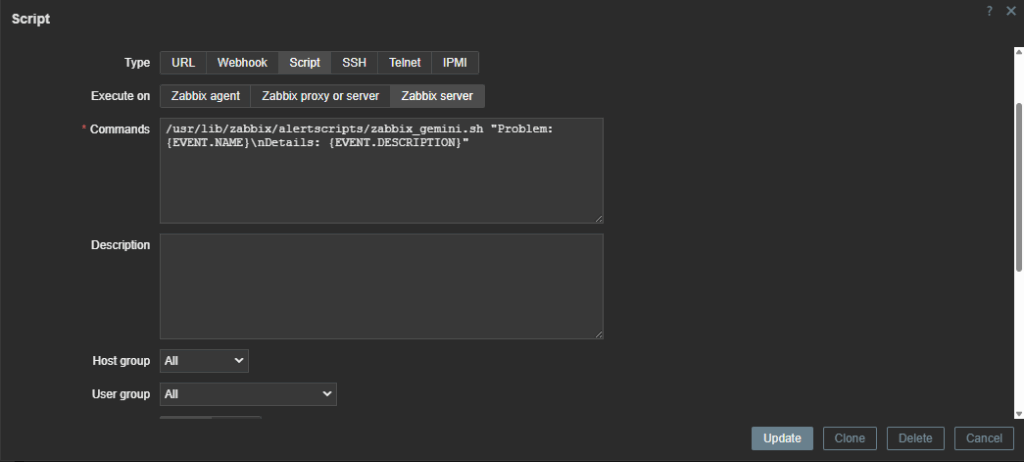
2. Enter the name “AI Assistance” under Scope: choose Manual Event Action.
- Type: Script Execution.
- Execute on: Zabbix Server.
- Command:
/usr/lib/zabbix/alertscripts/zabbix_gemini.sh "Problem: {EVENT.NAME}\nDetails: {EVENT.DESCRIPTION}"- Host Group: All.
- User Group: All.
- Required Permission: Read.
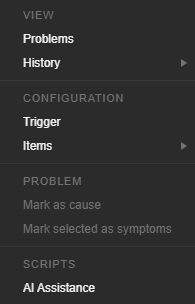
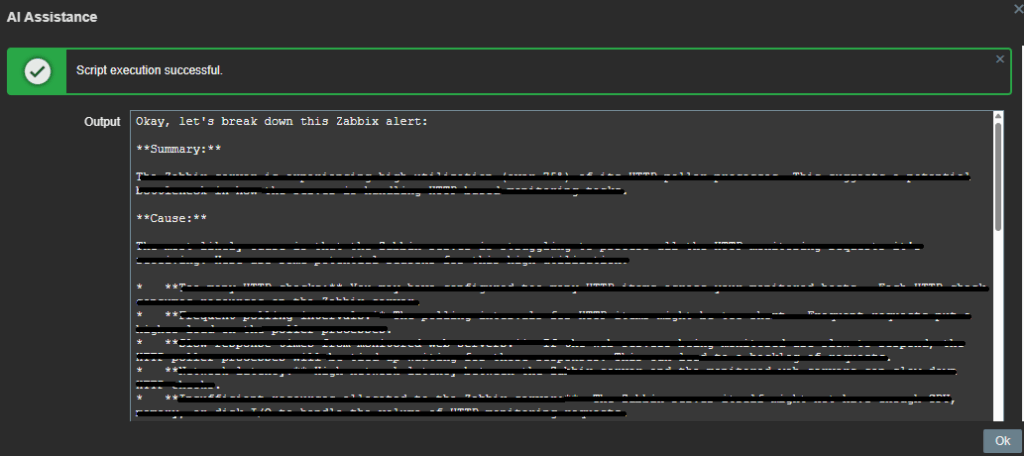
Once completed, the AI Assistance option will appear when you click on a problem, providing a summary, the probable cause, and recommended actions.
Conclusion:
Integrating AI with Zabbix can transform your monitoring system from reactive to proactive. The personal assistant not only interprets alerts but also learns from patterns and helps your team focus on actionable insights rather than raw data.
With continuous refinement, this assistant can evolve into an intelligent automation layer capable of predicting failures before they occur.