

Zabbix can monitor your servers, applications, and network devices. For prompt action on crucial issues, alerts can be linked to your team’s communication tools including Slack, Microsoft Teams, or other messaging services. This article will help you set up Zabbix to send alerts to your team channel.
Step 1: Configure Zabbix Alerts on Team Channel.
1: Prepare Your Team Channel.
Slack: Create a new channel or select an existing one for alerts. Generate an Incoming Webhook URL from Slack App settings.
Microsoft Teams: Create a channel in a Team and add an Incoming Webhook connector to get the webhook URL.
Other Platforms: Ensure your platform supports webhooks or API-based message posting.
Step 2: Configure Media Type in Zabbix.
Log in to the Zabbix web interface with an administrator account.
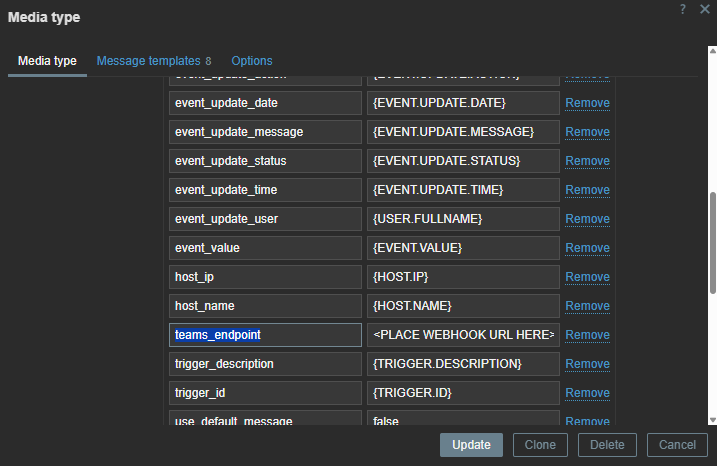
Go to Media types and select MS Teams or Slack.
In the Parameters section, locate the following fields:
MS Teams: teams_endpoint
Slack: bot_token
Enter the webhook URL for the corresponding application.

Step 3: Configure trigger action.
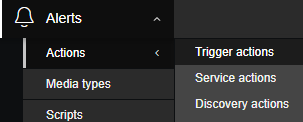
Go to Alerts → Actions → Trigger action → create action.
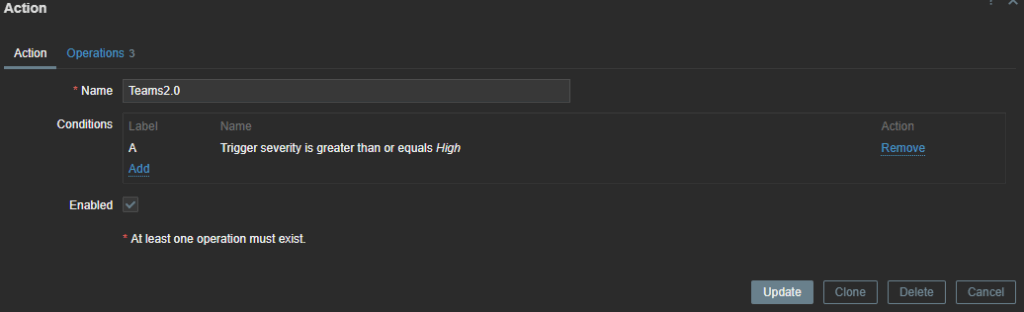
Name: Teams/Slack notification.
Type of calculation: AND/OR
Conditions: if Trigger severity is greater than or equals → High
In the Operations section, choose the target users or user groups, and set Send to as the media type MS Teams or Slack.
Adjust the conditions for Recovery and Update operations, then save the changes.
Best Practices
- Severity Levels: Only send critical alerts to team channels to reduce noise.
- Templates: Use templates for consistent monitoring across multiple hosts.
- Escalation: Configure escalation rules to alert different teams based on the issue duration or severity.
- Test Regularly: Test alerts periodically to ensure messages are delivered correctly.
Conclusion
Integrating Zabbix with Slack or Microsoft Teams helps deliver real-time notifications about critical issues to your team. This helps improving response time to issues and helps minimize system downtimes. You can make monitoring and managing incidents seamless by configuring media types, assigning them to users, and creating actions with relevant conditions. Having regular tests and adjustments to your alert settings would always ensure that your organisation has an efficient and practical alerting system.